A small Windows Forms utility that solves a real daily problem
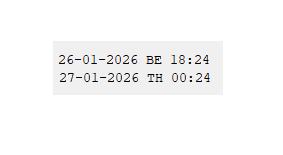
Sometimes software does not need to be complex to be useful. This small Windows Forms application is a good example of how a few well chosen design decisions can result in a practical and reliable tool. The application is a lightweight desktop clock that shows the current date and time for two locations at the same time: Belgium and Thailand. It was written in C# using Windows Forms and targets the .NET 6.0 desktop stack.
Why I have created this tool
While I was working remotely from Bangkok I wanted to know what time it was in Thailand and Belgium in one eyesight and I always on top my Windows desktop. Scheduling calls, checking deadlines, or simply knowing whether someone on the other side of the world is awake can become repetitive mental work. Instead of relying on web pages, browser tabs, or large desktop widgets, this application keeps things minimal. It runs as a tiny borderless window that can sit anywhere on the screen and updates itself every second.
Technical overview
The application is built around a single Windows Forms form that inherits from the standard Form class. This immediately tells us that it is a classic WinForms application, not WPF and not a web based UI.
The core elements are:
• Two Label controls to display time and date
• One Timer that ticks every second
• A small amount of logic for time zone conversion
• Custom mouse handling to allow dragging the window
There is no external dependency and no configuration file. Everything runs locally.
Time zone handling
The clock uses DateTime.UtcNow as its base reference. From that single UTC value, it calculates local times using TimeZoneInfo.
Two Windows time zone identifiers are used:
• W. Europe Standard Time for Belgium
• SE Asia Standard Time for Thailand
By converting from UTC rather than from local time, the code avoids subtle errors around daylight saving changes and system locale differences. This is a good practice and scales well if more time zones were ever added.
User interface decisions
The form is intentionally borderless. This removes window chrome and avoids visual noise. Because a borderless window cannot normally be dragged, the application implements its own mouse handling.
When the user presses the left mouse button, the current mouse position is stored. While the button remains pressed, the form position is updated relative to the mouse movement. This makes the entire widget draggable without additional UI elements. The font choice is Courier New. This ensures monospaced alignment so that time values do not visually jump when digits change. Small details like this significantly improve perceived stability. The window width is adjusted dynamically based on the widest label. This keeps the layout compact while still preventing clipped text.
Resource management
The form implements proper disposal of its components through the Dispose override. While this application is small, following correct disposal patterns is important in long running desktop applications and shows disciplined engineering. The timer is owned by the form’s component container, which means it is cleaned up automatically when the form is disposed.
What this example demonstrates
This project is intentionally simple, but it demonstrates several important engineering principles:
• Using the right abstraction level for the problem
• Correct handling of time zones
• Respect for UI stability and usability
• Clean separation between initialization, logic, and event handling
• Avoiding unnecessary complexity
There is no database, no configuration screen, no background service. The code does exactly what is needed and nothing more.
Why Windows Forms still makes sense here
Windows Forms is sometimes seen as old technology, but for small desktop utilities it remains very effective. Startup time is fast, deployment is simple, and behavior is predictable.
Code
using System;
using System.ComponentModel;
using System.Drawing;
using System.Windows.Forms;
public class Form1 : Form
{
private Point lastPoint;
private IContainer components = null;
private Label label1;
private Timer timer1;
private Label label2;
public Form1()
{
InitializeComponent();
InitializeClock();
}
private void timer1_Tick(object sender, EventArgs e)
{
DateTime nowUtc = DateTime.UtcNow;
DateTime gmtPlus1 = TimeZoneInfo.ConvertTimeFromUtc(nowUtc, TimeZoneInfo.FindSystemTimeZoneById(“W. Europe Standard Time”));
DateTime gmtPlus7 = TimeZoneInfo.ConvertTimeFromUtc(nowUtc, TimeZoneInfo.FindSystemTimeZoneById(“SE Asia Standard Time”));
label1.Text = $”{gmtPlus1:dd-MM-yyyy} BE {gmtPlus1:HH:mm}”;
label2.Text = $”{gmtPlus7:dd-MM-yyyy} TH {gmtPlus7:HH:mm}”;
base.Width = Math.Max(label1.Width, label2.Width) + 10;
}
private void InitializeClock()
{
base.FormBorderStyle = FormBorderStyle.None;
Font = new Font(“Courier New”, 8f, FontStyle.Regular);
foreach (Control control in base.Controls)
{
control.MouseDown += Form1_MouseDown;
control.MouseMove += Form1_MouseMove;
}
}
private void Form1_MouseDown(object sender, MouseEventArgs e)
{
if (e.Button == MouseButtons.Left)
{
lastPoint = new Point(e.X, e.Y);
}
}
private void Form1_MouseMove(object sender, MouseEventArgs e)
{
if (e.Button == MouseButtons.Left)
{
base.Left += e.X – lastPoint.X;
base.Top += e.Y – lastPoint.Y;
}
}
protected override void Dispose(bool disposing)
{
if (disposing && components != null)
{
components.Dispose();
}
base.Dispose(disposing);
}
private void InitializeComponent()
{
this.components = new System.ComponentModel.Container();
this.label1 = new System.Windows.Forms.Label();
this.timer1 = new System.Windows.Forms.Timer(this.components);
this.label2 = new System.Windows.Forms.Label();
base.SuspendLayout();
this.label1.AutoSize = true;
this.label1.Location = new System.Drawing.Point(2, 9);
this.label1.Name = “label1”;
this.label1.Size = new System.Drawing.Size(38, 15);
this.label1.TabIndex = 0;
this.label1.Text = “label1”;
this.timer1.Enabled = true;
this.timer1.Interval = 1000;
this.timer1.Tick += new System.EventHandler(timer1_Tick);
this.label2.AutoSize = true;
this.label2.Location = new System.Drawing.Point(3, 26);
this.label2.Name = “label2”;
this.label2.Size = new System.Drawing.Size(38, 15);
this.label2.TabIndex = 1;
this.label2.Text = “label2”;
base.AutoScaleDimensions = new System.Drawing.SizeF(7f, 15f);
base.AutoScaleMode = System.Windows.Forms.AutoScaleMode.Font;
base.ClientSize = new System.Drawing.Size(120, 50);
base.Controls.Add(this.label2);
base.Controls.Add(this.label1);
base.Name = “Form1”;
this.Text = “Form1”;
base.ResumeLayout(false);
base.PerformLayout();
}
}