Remote access is one of those things that quietly becomes mission critical once you work remote or manage multiple systems. I use remote desktop tools every single day, so trust, performance, and control matter more to me than flashy features. Instead of relying on classic remote desktop tools like TeamViewer or AnyDesk, with their expensive recurring subscription costs, I wanted a setup where I fully control authentication, data flow, and availability. By hosting the solution myself, I gain full ownership of the infrastructure while keeping the user experience simple, fast, and reliable. That is exactly why I decided to deploy my own RustDesk server.
Why RustDesk Was the Right Choice
RustDesk stands out because it is open source and designed from the start to be self hosted. That means no vendor lock in and no hidden dependencies on external servers once your own infrastructure is running. Performance was another decisive factor. A locally hosted RustDesk server removes unnecessary hops.
My Deployment Setup
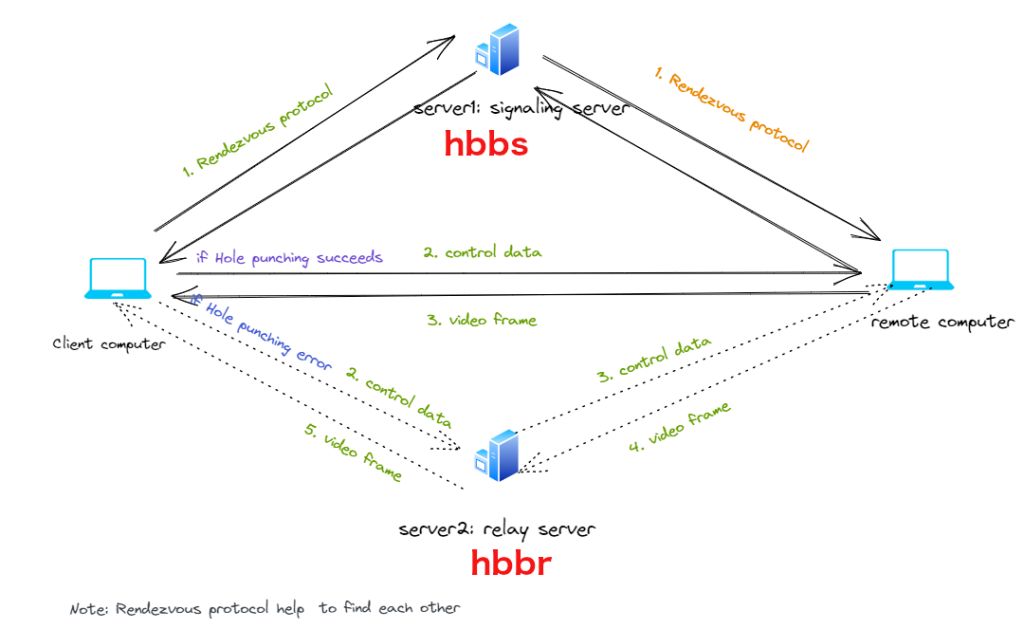
I deployed my RustDesk server on my own infrastructure on a minicomputer running Ubuntu, integrated with my existing network. The server handles rendezvous and relay traffic, while clients connect directly whenever possible. The result is a clean architecture where I know exactly what runs where. Updates are under my control and the system fits naturally into my broader homelab and remote work setup.
Security and Privacy First
By running my own RustDesk server, encryption keys stay under my control and authentication policies are defined by me, not by a third party service. This approach aligns perfectly with a professional mindset where reliability and trust are not optional features but baseline requirements.
Day to Day Experience
In daily use the system simply disappears into the background. Connections are fast, stable, and predictable. I can access systems from anywhere without worrying service limitations and pricing tiers.