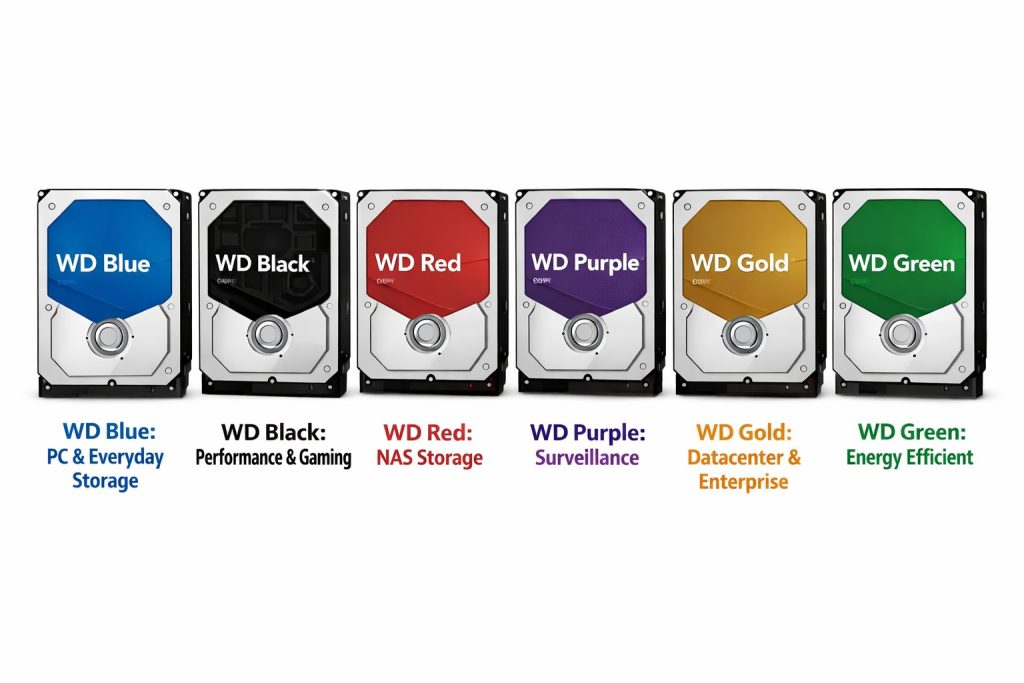
Western Digital uses a clear color coding system to indicate what each hard drive is designed for. The color is not cosmetic. It reflects firmware tuning, workload profile, reliability targets, and the environment the drive is expected to run in. Choosing the right color matters for performance, lifespan, and data safety. Below is a practical overview of all Western Digital drive colors and what they are meant for.
WD Blue
General purpose computing
WD Blue drives are the everyday workhorses. They are designed for normal desktop and laptop use such as office work, web browsing, light photo editing, and casual storage.
Typical use cases
- Home PCs
- Student laptops
- Basic workstations
Key characteristics
- Balanced performance and power consumption
- Designed for intermittent workloads
- Best choice when cost and versatility matter more than specialization
WD Black
High performance computing
WD Black drives focus on speed and responsiveness. They are optimized for systems where performance is more important than noise or power efficiency.
Typical use cases
- Gaming PCs
- Content creation workstations
- Heavy multitasking desktops
Key characteristics
- Higher rotational speed and cache sizes
- Optimized for fast read and write operations
- Not intended for continuous operation environments
WD Red
NAS and always on storage
WD Red drives are built specifically for Network Attached Storage systems. They are designed to run continuously in multi drive enclosures.
Typical use cases
- NAS systems at home or in small businesses
- File servers
- Backup appliances
Key characteristics
- Optimized for twenty four seven operation
- Firmware tuned for RAID environments
- Lower vibration and better heat tolerance
WD Red Plus and WD Red Pro exist for heavier workloads and larger NAS systems.
WD Purple
Video surveillance and CCTV
WD Purple drives are engineered for surveillance systems that constantly write video streams from multiple cameras.
Typical use cases
- CCTV recorders
- IP camera systems
- Security monitoring installations
Key characteristics
- Optimized for continuous sequential writing
- Supports many simultaneous video streams
- Designed to minimize dropped frames
This is the right choice when data is written constantly and rarely read.
WD Gold
Enterprise and data center workloads
WD Gold drives target professional environments where reliability and endurance are critical.
Typical use cases
- Servers
- Data centers
- Mission critical storage systems
Key characteristics
- Very high workload ratings
- Designed for continuous heavy use
- Extended reliability testing and longer warranties
These drives are overkill for home use but ideal where downtime is unacceptable.
WD Green
Low power and archival use
WD Green drives focus on energy efficiency and low noise. They are less common today but still relevant in specific scenarios.
Typical use cases
- Secondary storage
- Archival data
- Systems where power consumption matters most
Key characteristics
- Lower power usage
- Not suited for heavy or continuous workloads
- Best used as cold storage
Choosing the right color matters
Using the wrong drive for the job can shorten its lifespan or reduce reliability. A surveillance system with a desktop drive or a NAS filled with standard consumer disks is a common mistake that leads to failures over time.
As a rule of thumb
- Blue for everyday computing
- Black for performance
- Red for NAS
- Purple for CCTV
- Gold for enterprise
Western Digital’s color system makes it easy to pick the right tool for the job as long as you respect what each color is designed to do.
For a professional setup whether at home or in a small business environment matching the drive to the workload is just as important as capacity or price.