One of the small but surprisingly delightful features of Windows 11 is Windows Spotlight. With an easy setting of your wallpaper, your desktop greets you with a new, carefully selected image. Landscapes, space photography, abstract art. People go happy to the office, wondering which high quality stock picture of a remote place on earth that they will see that day.
What many people do not realize is that Kubuntu already has this exact idea built in, and it does so in a way that is fully reliable, lightweight, and respectful of system resources.
The hidden gem in KDE Plasma
In KDE Plasma, the feature lives in plain sight but is easy to overlook. When you right click on the desktop and open Desktop Folder Settings, the wallpaper type can be set to Picture of the Day.
This is not a third party plugin.
This is not a script.
This is not a live wallpaper engine.
It is a native KDE feature.
Once enabled, Plasma automatically downloads one curated image per day and applies it as your wallpaper. The image is static, high quality, and properly scaled. No animation loops. No GPU load. No background services chewing on your system.
The hidden gem in KDE Plasma
How to apply it
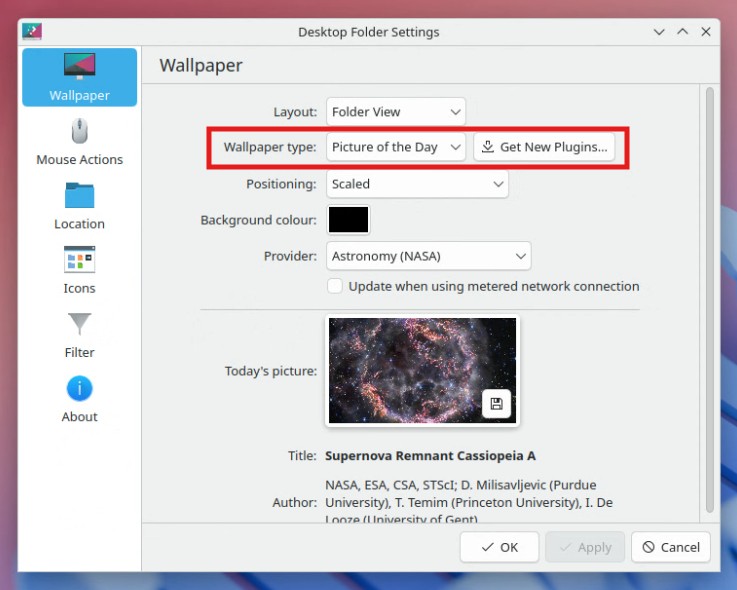
On Kubuntu, you right click on an empty area of the desktop and select Configure Desktop and Wallpaper. In the settings window, you stay on the Wallpaper section and change Wallpaper type to Picture of the Day. You then choose a provider such as NASA Astronomy, adjust the positioning if needed, and confirm the settings. From that moment on, Kubuntu automatically downloads and displays a new high quality wallpaper each day without requiring extra tools or background services.
Curated sources, not randomness
What makes this feature feel similar to Windows Spotlight is not just the automation, but the source quality.
Depending on your Plasma version, you can choose from providers such as:
- Astronomy images from NASA
- Daily photography selections from Bing
- Curated images from platforms like Unsplash
These are not random uploads. They are editorial selections, often with metadata such as title, author, and source. KDE even shows you this information directly in the settings panel, which adds a subtle educational layer that Windows Spotlight users will recognize.
Reliability first, always
A key difference with many Linux desktop customizations is reliability. Animated wallpapers, shader effects, or external wallpaper engines may look impressive in screenshots, but they often introduce instability over time. Especially on laptops, virtual machines, or remote desktop setups, they can cause stuttering, higher power usage, or unexpected glitches.
KDE’s Picture of the Day avoids all of that by design:
- Only one image is downloaded per update
- The wallpaper is static
- Updates run at low priority
- There is no continuous rendering
This makes it suitable even for professional or long running systems where stability matters more than visual spectacle.
Zero configuration, zero maintenance
Just like Windows Spotlight, this is a true “set it and forget it” feature. You select Picture of the Day once, choose your provider, and you are done. There is no need to manage folders, schedule tasks, or install additional software. KDE handles everything quietly in the background. Even on metered connections, Plasma gives you control, allowing you to prevent updates when bandwidth matters.