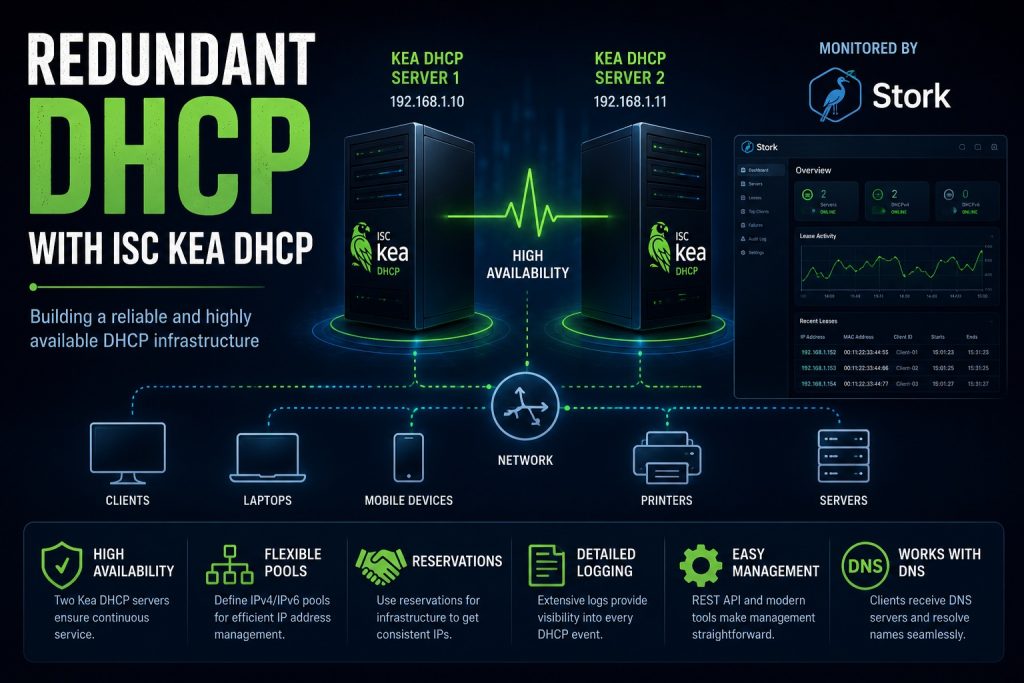
A DHCP server is one of the most critical services in any network. If DHCP becomes unavailable, devices may no longer receive IP addresses, causing users and services to lose network connectivity. For that reason, I recently upgraded my homelab infrastructure from a single DHCP server to a redundant DHCP setup using ISC Kea DHCP.
Why redundancy matters
In many home and small business environments, DHCP runs on a single server, usually the gateway of the network. While this setup is simple, it introduces a single point of failure. Hardware issues, operating system problems, maintenance activities, or software updates can all result in DHCP becoming temporarily unavailable.
Although existing devices can often continue operating with their current lease, problems quickly arise when new devices join the network or existing leases expire.
By deploying two DHCP servers, the service remains available even if one server becomes unavailable.
Why ISC Kea DHCP
ISC Kea is the modern successor to the well known ISC DHCP server. It provides a more modern architecture, improved API capabilities, database integration options, and active development.
Some of the advantages include:
- Modern and actively maintained codebase
- Native REST API support
- High availability capabilities
- Extensive logging and monitoring options
- IPv4 and IPv6 support
- Future proof architecture
For anyone building new DHCP infrastructure, Kea is generally the recommended choice over the legacy ISC DHCP daemon.
Another reason for moving away from the DHCP service on the ASUS router was the need for greater configuration flexibility. The built in DHCP implementation did not support the PXE boot options required for network based operating system deployments. ISC Kea DHCP provides significantly more flexibility, allowing advanced DHCP options to be configured and making it suitable for more complex infrastructure requirements.
Architecture
The environment consists of two Debian virtual machines running on separate Proxmox hypervisors.
The DHCP servers share the same configuration and operate in a high availability setup. If one server becomes unavailable, the second server continues serving leases.
The servers provide:
- Dynamic IP address allocation
- DHCP reservations for infrastructure systems
- Centralized management of address pools
- High availability for critical network services
Running the DHCP servers as virtual machines provides an additional benefit. The complete systems can be backed up and restored quickly through Proxmox, reducing recovery times in the event of a failure.
Migration to DHCP reservations
As part of this project, many infrastructure systems that previously used manually configured static IP addresses were migrated to DHCP reservations.
This approach offers several advantages:
- Centralized IP address management
- Easier documentation
- Faster replacement of devices
- Reduced configuration errors
- Better visibility of network assets
The devices still receive the same IP addresses, but those addresses are now managed centrally by the DHCP infrastructure.
Configuring Kea DHCP
ISC Kea DHCP is configured through JSON configuration files. For IPv4, the main configuration file is usually ‘kea-dhcp4.conf’. This file defines how the DHCP server behaves, including the network interfaces it listens on, the subnets it manages, the address pools it may use, the default gateway, DNS servers, lease times, reservations, logging, and high availability settings.
A simplified configuration contains a dhcp4 section with one or more subnets. Each subnet contains a network range, one or more DHCP pools, and optional parameters such as routers and DNS servers. Reservations can also be added so that important devices always receive the same IP address based on their MAC address.
Because the configuration is JSON based, it is structured and readable, but also strict. A missing comma, bracket, or quotation mark can prevent the service from starting. For that reason, configuration changes should be validated before restarting Kea. This makes the setup more technical than the DHCP page of a consumer router, but it also provides much more control and flexibility
Monitoring and validation
After deployment, the DHCP servers were extensively tested to verify correct operation.
Testing included:
- Lease allocation
- DHCP reservations
- Server failover scenarios
- Virtual machine reboots
- Network interruptions
- Client renewals
Monitoring was integrated into the existing infrastructure to ensure that both DHCP servers remain healthy and available.
Monitoring with ISC Stork
Both DHCP servers are monitored with ISC Stork. Stork provides a central web interface for observing Kea services, checking server status, reviewing configuration details, and following lease activity. This makes the redundant DHCP setup easier to manage, because both servers can be monitored from one place instead of checking each server separately.
For this setup, Stork is especially useful because it gives quick visibility into the health of both DHCP servers and helps confirm that the high availability configuration is working as expected.
Learning how DHCP really works
One of the most rewarding aspects of building this infrastructure was gaining a deeper understanding of how DHCP actually works behind the scenes. Most network users never think about DHCP. Devices simply connect and receive an IP address automatically. However, once you start operating your own DHCP servers, you can observe the entire process in detail through Kea’s logging and monitoring capabilities.
By examining the logs, it becomes possible to see every DHCP Discover, Offer, Request, and Acknowledgement exchanged between clients and the DHCP servers. What normally happens invisibly in a fraction of a second suddenly becomes visible.
The project also provided a much better understanding of DHCP address pools. A pool defines the range of IP addresses that can be assigned dynamically to clients. When a device joins the network, Kea selects an available address from the configured pool and creates a lease. These leases can be observed directly, making it easy to see which devices are active on the network and which addresses are currently in use. You can also change the lease time to see how the clients react to it.
Another interesting aspect is the relationship between DHCP and DNS. DHCP provides devices with an IP address, subnet mask, default gateway, and DNS server information. Once connected, devices use DNS to translate hostnames into IP addresses. In practice, DHCP and DNS work closely together to make modern networks function seamlessly.
Building the system personally, troubleshooting configuration issues, validating failover scenarios, and observing real lease activity provided a deeper understanding of network infrastructure than simply reading about DHCP in a textbook.
Conclusion
The migration to a redundant ISC Kea DHCP infrastructure significantly improved the resilience of my homelab network. With two DHCP servers operating in a high availability configuration, the risk of a DHCP outage has been greatly reduced.
Combined with Proxmox virtualization, automated backups, and infrastructure monitoring, the DHCP service is now far more robust than the original single server deployment.
For anyone building a modern homelab or small business network, ISC Kea DHCP is definitely worth considering.