Understanding the PERC H700 battery
The Dell PowerEdge R610 is a 1 unit enterprise rack server from the late 2000s, originally introduced in 2009 as part of Dell’s 11th generation PowerEdge lineup. Designed for data centers and enterprise IT environments, it belongs to an era when Intel Xeon 5500 and 5600 series processors, DDR3 memory and SAS hard drives were standard technologies in professional servers. Despite its age, the PowerEdge R610 remains an interesting machine for experimenting with server hardware, RAID configurations, virtualization and remote management. One of its advantages is its ability to support up to 192 GB of DDR3 ECC Registered RAM (RDIMM). With the current “RAMageddon”, where memory prices have reportedly increased by as much as five times for certain products, older enterprise servers are becoming an interesting alternative. Secondhand DDR3 RDIMM memory is relatively inexpensive, making it possible to build a server with 192 GB of RAM without spending a fortune on modern memory modules. Of course, the older Xeon processors are less energy efficient than modern CPUs, but for a home lab, testing environment or virtualization projects, the PowerEdge R610 can still be a useful machine. As part of my ongoing project to refurbish a Dell PowerEdge R610, I was working on a configuration equipped with two Intel Xeon E5640 processors, 16 GB of ECC RAM, six 500 GB SATA hard drives and a Dell PERC H700 RAID controller with 1 GB of cache memory. During my inspection of the server, I discovered that the RAID controller was reporting a degraded status. Interestingly, the RAID 6 virtual disk was still operational. This raised an important question: was something wrong with the hard drives, the RAID configuration or the controller itself?
Investigating the degraded RAID controller
My first step was to investigate the storage configuration through the Dell management interface. The server uses iDRAC6 Enterprise, which allows hardware monitoring and remote administration. I checked the storage information and examined the physical disk configuration. All six hard drives were recognized, and the virtual disk was still reporting an operational status. This suggested that the degraded controller status was not necessarily caused by a failed hard drive. The next component to investigate was the battery connected to the PERC H700 RAID controller. In the iDRAC interface, the relevant information can be found under:
Storage → PERC H700 Integrated → Battery
This section provides information about the RAID controller’s battery status. A degraded battery can explain why the RAID controller reports a warning even when the underlying RAID array is functioning normally.
What is the PERC H700 battery used for?
The PERC H700 includes 1 GB of onboard cache memory. This memory can temporarily store data during read and write operations. The battery is part of the controller’s Battery Backup Unit, commonly abbreviated as BBU. Its primary purpose is to protect data temporarily stored in the RAID controller’s write cache if the server unexpectedly loses power. To understand why this matters, consider what happens when an application writes data to a RAID array. With write back caching enabled, the RAID controller can acknowledge a write operation before the data has actually been written to the physical disks. The data remains temporarily in the controller’s cache until it can be transferred to the disks. This improves performance, particularly when many small write operations are performed. However, the cache uses volatile memory. Without electrical power, its contents disappear. The RAID battery provides temporary backup power to preserve cached data during a power failure. When power is restored, the controller can recover the cached information and complete the pending disk writes. The battery is therefore an important component of the storage system’s data protection mechanism. It is worth emphasizing that the battery does not power the complete server, the hard drives or the iDRAC controller. It is specifically intended to protect the RAID controller’s cached data.
What happens when the battery fails?
When the battery is defective, discharged or no longer able to provide sufficient backup power, the PERC H700 may disable write back caching. Depending on the controller configuration, it can switch to write through mode. In write through mode, the controller generally waits until the data has been committed to the physical disks before acknowledging the write operation. This provides greater protection against losing acknowledged writes when battery backup is unavailable, but it can reduce write performance. The impact depends on the workload. Applications performing frequent small write operations, such as databases or virtual machines, may experience a noticeable reduction in performance. Importantly, a defective RAID battery does not automatically mean that the RAID array itself is damaged. The physical disks and the RAID 6 virtual disk can remain operational while the controller reports a battery warning. This distinction was particularly relevant during my investigation.
Ordering a replacement battery
After investigating the storage controller, I obtained a replacement battery for the PERC H700. The H700 uses a dedicated battery backup assembly, separate from the controller card itself. Compatible battery assemblies can be found under several Dell part numbers, including FR463, NU209, U8735, UF302 and XJ547, although the exact assembly and cable compatibility must be checked. These are typically lithium ion battery assemblies rated at approximately 3.7 V. The battery connects to the RAID controller through a dedicated cable. When buying a replacement, it is important to verify both the battery assembly and the connector compatibility.
Finding the battery inside the PowerEdge R610
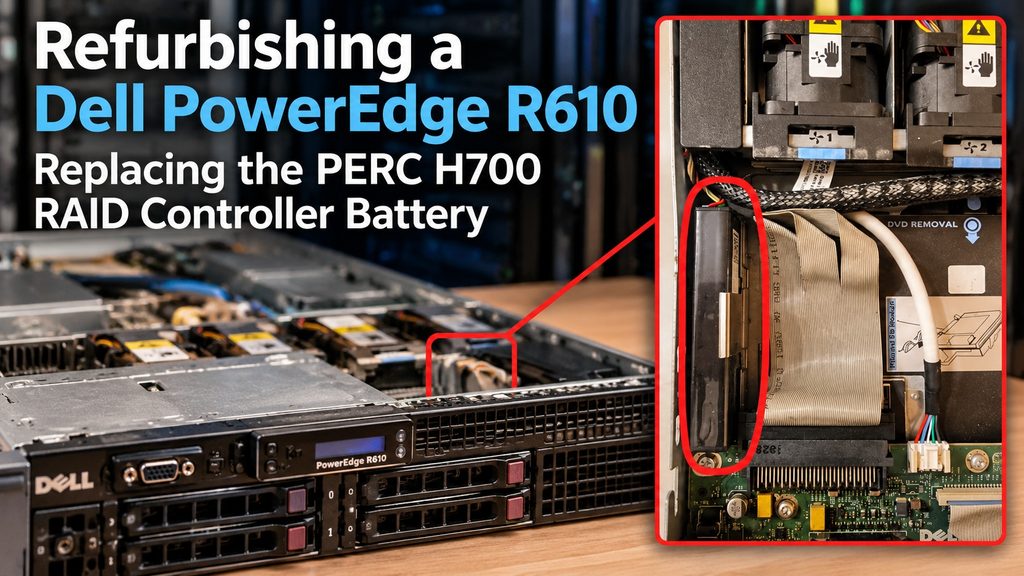
After my replacement battery arrived. I opened the PowerEdge R610 to investigate where the battery should be installed. Surprisingly, locating the battery mounting position was not immediately obvious. The battery is not necessarily mounted directly on top of the RAID controller. In the R610 chassis, the battery assembly is installed separately in a dedicated mounting location, with a cable connecting it to the PERC controller. The mounting area is located along the internal chassis wall near the front control panel and optical drive area. Someone unfamiliar with the R610 might initially search only around the RAID controller card. Before replacing the battery, the server must be shut down and disconnected from its power supplies. The replacement procedure involves locating the battery assembly, disconnecting its cable, removing the existing battery and installing the compatible replacement. The cable must then be reconnected securely to the RAID controller. Once you know where it is. it is easy to replace it.
Verifying the replacement
After replacing a RAID controller battery, the next step is to verify that the controller recognizes it correctly. The battery information can be checked through iDRAC6 or the PERC configuration utilities. Several conditions should be examined:
- The battery is detected by the controller.
- The battery status is healthy or progressing through an expected charging cycle.
- No persistent battery fault is reported.
- The controller’s cache policy is configured appropriately.
- The virtual disk remains healthy.
A newly installed battery may require charging or a controller initiated battery learning cycle before its status becomes fully healthy. It is also important to distinguish between the configured cache policy and the current cache policy. For example, the controller might be configured to use write back caching but temporarily operate in write through mode because battery protection is unavailable. Once the battery becomes operational, the controller may restore its normal caching behavior. A battery warning should not simply be ignored or cleared without investigating its cause.
The difference between the iDRAC battery and the RAID battery
One source of confusion is the terminology used when discussing Dell server hardware. The PowerEdge R610 contains several components responsible for different aspects of system operation.
iDRAC6 Enterprise provides remote management capabilities, including hardware monitoring, power control and remote console access.
PERC H700 manages the physical hard drives, RAID arrays and controller cache.
PERC battery backup unit provides temporary power to protect data stored in the RAID controller’s volatile cache.
CMOS or RTC battery helps maintain the system’s real time clock and certain firmware settings when external power is unavailable.
These components serve different purposes. Replacing the RAID controller battery will not resolve an iDRAC remote console problem or a system clock battery problem.
Conclusion
Working with older enterprise servers provides an excellent opportunity to understand how storage systems operate at a hardware level. My investigation of the Dell PowerEdge R610 demonstrated that a degraded RAID controller status does not necessarily indicate a failed disk or a damaged RAID array. In this case, the battery backup system became an important part of the troubleshooting process. The experience also highlighted an easily overlooked detail: the PERC H700 battery is physically separate from the RAID controller and has its own mounting location inside the chassis. Understanding the relationship between RAID caching, battery protection and write policies is useful when maintaining enterprise storage systems. Even an older server such as the PowerEdge R610 can teach valuable lessons about data integrity, storage performance and hardware diagnostics.