Software testing has evolved considerably over the past decade. Modern web applications are becoming increasingly complex, and ensuring that they work reliably across different browsers and platforms is an essential part of software development. Manual testing remains important, but repetitive regression tests can quickly become time consuming and expensive. This is where test automation frameworks come into play.
One of the most interesting new tools (v1.0 was released in 2020) in this field is Playwright, an open source browser automation framework developed by Microsoft. But what exactly is Playwright? How does it compare with established tools such as Selenium and Cypress? And why should software testers and developers consider using it?
In this article, we explore the capabilities of Playwright and explain why it has become an attractive choice for modern software test automation.
What Is Playwright?
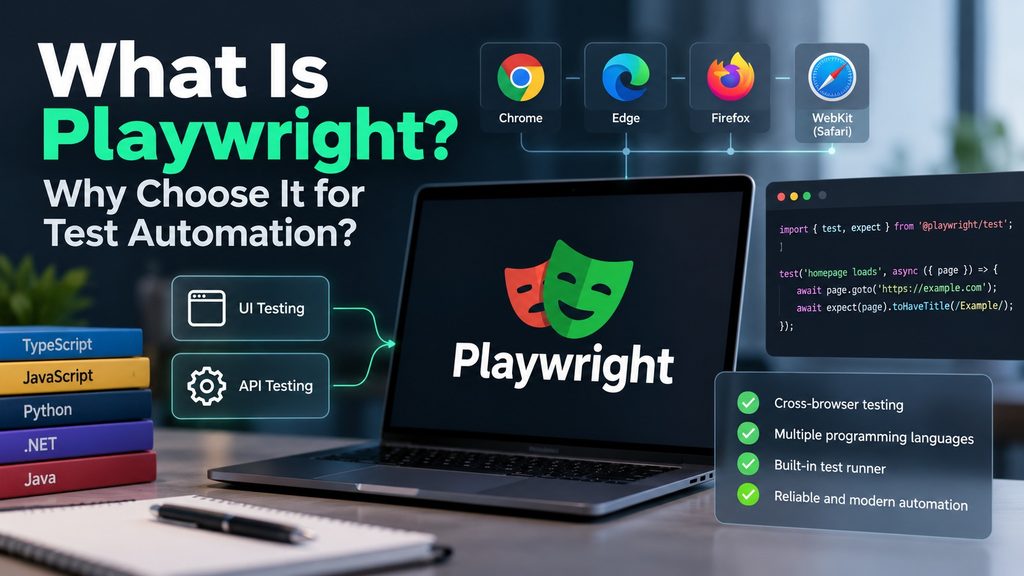
Playwright is an open source automation framework developed by Microsoft that enables developers and software testers to automate interactions with modern web applications. It is primarily designed for end to end testing, allowing automated tests to simulate how real users interact with websites. For example, an automated Playwright test can open a website, navigate between pages, enter information into forms, click buttons and verify that the application behaves as expected.
However, Playwright is not limited to testing graphical user interfaces. It also supports API testing, making it possible to validate both frontend and backend functionality within the same testing environment. This combination makes Playwright particularly interesting for organizations looking to improve their software quality assurance processes.
Cross Browser Testing With Playwright
One of the major advantages of Playwright is its support for multiple browser engines. A web application that functions correctly in one browser may behave differently in another. Differences in rendering engines, JavaScript implementations and browser specific behavior can introduce unexpected defects.
Playwright addresses this challenge by supporting three major browser engines:
Chromium
Chromium is the open source browser engine used by Google Chrome and Microsoft Edge.
Firefox
Firefox uses Mozilla’s Gecko browser engine, providing an independent implementation of web standards.
WebKit
WebKit is the browser engine used by Apple’s Safari browser.
By supporting these three engines, Playwright allows testers to verify application behavior across the major browser technologies. Playwright can also automate branded browsers such as Google Chrome and Microsoft Edge.
Browser Versions and Compatibility
Another important characteristic of Playwright is how it manages browser compatibility. Each Playwright release is designed to work with specific versions of its supported browser binaries. This reduces the compatibility problems that can occur when automation frameworks and browsers evolve independently. Instead of manually searching for compatible browser drivers, testers can install the browser binaries associated with their Playwright version. For organizations maintaining large automated regression test suites, this simplifies test environment management. It also helps create more predictable testing conditions across development machines and continuous integration environments.
Which Programming Languages Does Playwright Support?
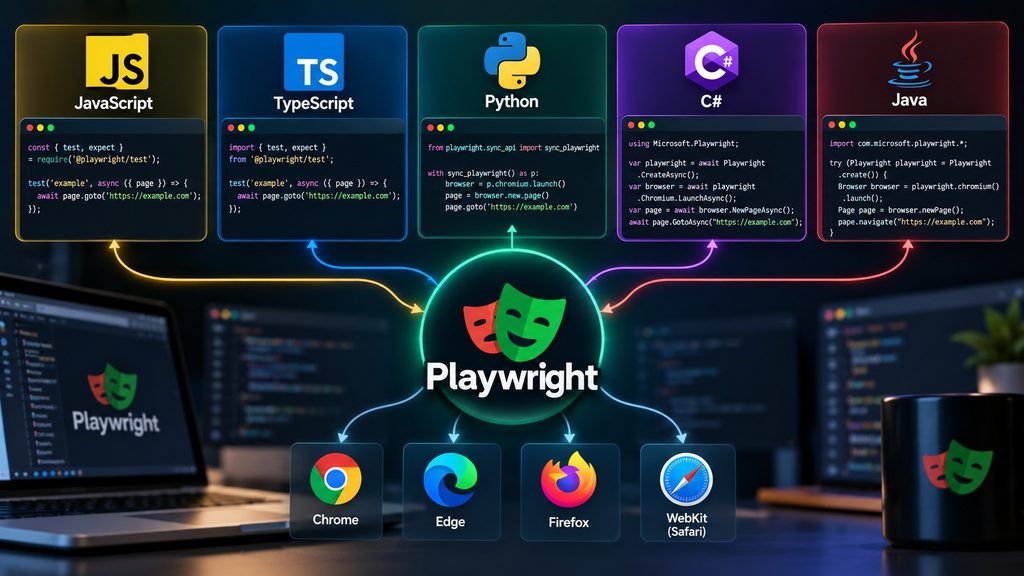
Playwright is not restricted to a single programming language.
It officially supports several widely used languages:
- JavaScript
- TypeScript
- Python
- C#
- Java
This flexibility allows development and QA teams to integrate Playwright into their existing technology stacks. For example, a development team working primarily with .NET applications can implement automated tests using C#. A team already using Python for automation or backend development can use Playwright’s Python bindings. Meanwhile, JavaScript and TypeScript developers can work with Playwright directly within their existing development ecosystem. This is particularly valuable for organizations that want to introduce test automation without requiring their engineers to learn an entirely new programming language.
Choosing the Right Language
There is no universally correct programming language for Playwright automation. The best choice depends on the existing development environment, team expertise and project requirements. TypeScript is particularly attractive for teams developing modern web applications because of its integration with the JavaScript ecosystem and the Playwright Test framework. Python offers readable syntax and is often a practical choice for engineers transitioning from manual testing into automation. C# provides an interesting option for organizations working with Microsoft technologies and the .NET ecosystem. Ultimately, the programming language should support the team’s productivity rather than become an obstacle to adopting test automation.
Playwright Compared With Selenium and Cypress
When evaluating Playwright, two other automation frameworks frequently enter the discussion: Selenium and Cypress. All three tools can automate browser interactions, but their architectures and approaches differ.
Playwright and Selenium
Selenium has been one of the most established browser automation technologies for many years. It allows automated test scripts to control browsers through the WebDriver standard. Playwright follows a somewhat similar philosophy in the sense that automation is controlled externally rather than being limited to JavaScript execution inside the application itself. However, Playwright uses its own browser automation architecture rather than relying on Selenium WebDriver. This distinction allows Playwright to provide features such as automatic waiting, browser contexts and integrated tracing. Selenium remains a mature and widely adopted solution, particularly in organizations with existing automation infrastructure. Playwright offers an alternative designed around the requirements of modern web applications.
Playwright and Cypress
Cypress is another popular framework for testing web applications. Unlike Playwright, Cypress traditionally follows an architecture that is closely integrated with the browser and the JavaScript execution environment. Playwright controls browsers through an external automation interface. This architectural distinction is one reason why Playwright is often considered conceptually closer to Selenium than to Cypress. Both Playwright and Cypress provide modern testing capabilities, but their design choices can influence how they are integrated into larger testing environments. For teams evaluating a new automation framework, it is worth comparing not only the available features but also the architecture, supported languages and integration requirements.
Playwright as a Library or Testing Framework
An interesting aspect of Playwright is that it can be used in different ways. Developers can use Playwright as a browser automation library, integrating it into custom applications and automation scripts. Alternatively, they can use it as part of a structured testing framework. For JavaScript and TypeScript projects, Microsoft provides Playwright Test, a dedicated testing framework with an integrated test runner. Playwright itself provides the browser automation capabilities, while Playwright Test adds functionality for organizing, executing and analyzing automated tests.
What Is Playwright Test?
Playwright Test is a testing framework designed to simplify the creation and execution of automated tests. It provides several features that would otherwise require additional tools or custom implementations.
Built In Test Runner
Playwright Test includes its own test runner. This allows testers to organize tests, execute them and evaluate the results without having to build a separate execution framework. The syntax is familiar to developers who have previously worked with JavaScript testing frameworks such as Jest.
Parallel Test Execution
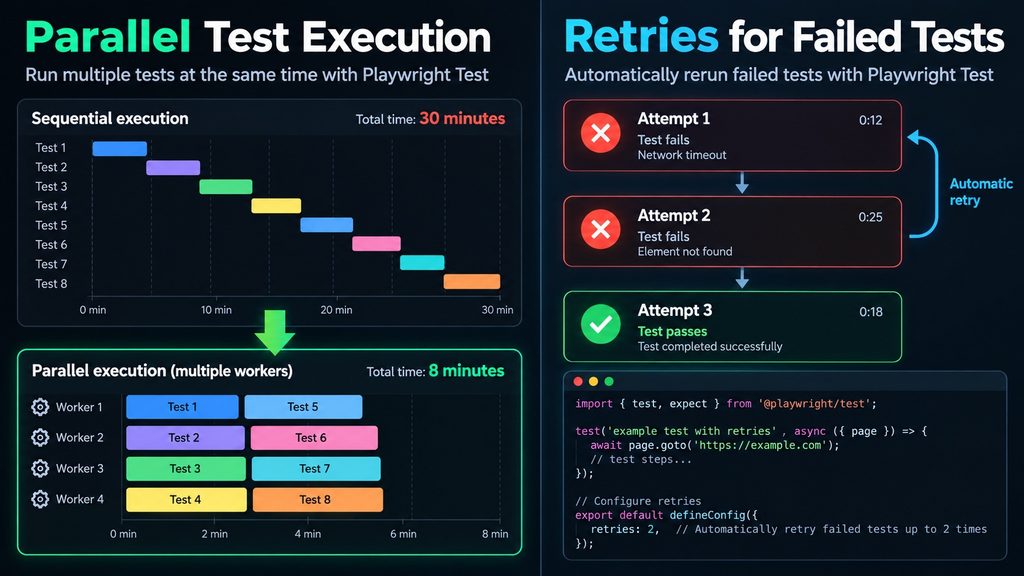
One of the most useful capabilities is parallel execution. Instead of executing every automated test sequentially, Playwright Test can distribute tests across multiple workers. This can significantly reduce the execution time of larger regression test suites. For example, a regression suite containing hundreds of tests may take considerable time when executed sequentially. Parallel execution can help reduce this duration, provided that the tests are sufficiently independent and the testing infrastructure has adequate resources.
Retries for Failed Tests
Playwright Test supports configurable test retries. When a test fails, the framework can automatically execute it again. This can be useful when investigating intermittent failures, although retries should never become a substitute for resolving unstable tests. A reliable automation suite should produce consistent results.
Test Reports and Debugging
When an automated test fails, identifying the cause can sometimes take longer than writing the test itself. Playwright Test provides several features that help engineers investigate failures. These include screenshots, video recordings, execution traces and HTML reports. The Playwright Trace Viewer is particularly useful because it allows engineers to inspect the sequence of actions performed during a test. This provides valuable information when analyzing unexpected application behavior.
Visual Studio Code Integration
Playwright also offers an extension for Visual Studio Code. The extension simplifies several common activities, including running tests, debugging failures and navigating through automated test cases. For developers and QA engineers already using Visual Studio Code, this integration can make the testing workflow more efficient.
Why Choose Playwright?
Several characteristics make Playwright particularly attractive for modern software testing.
1. UI and API Testing Within the Same Framework
Modern applications typically consist of multiple components communicating through APIs. Testing only the graphical user interface does not necessarily provide sufficient confidence in the complete application. Playwright supports both browser based UI testing and API testing. This allows teams to validate different layers of an application using a consistent automation technology. For example, an automated test could use an API request to prepare test data before opening the browser and verifying the resulting user interface. This approach can make tests faster and reduce unnecessary dependencies on manual setup procedures.
2. Automatic Waiting
One of the recurring challenges in browser automation is synchronization. Modern web applications frequently load content asynchronously. A button may not immediately become available after navigating to a page, or a form may require additional time before it can accept input. Traditional automation scripts sometimes address these situations by introducing fixed delays. Unfortunately, fixed delays can make tests unnecessarily slow and unreliable. Playwright provides automatic waiting mechanisms that help ensure elements are ready before certain actions are performed. For example, Playwright checks relevant conditions before clicking an element. This reduces the need for manually configured delays and can improve test stability.
3. Powerful Locators
Identifying elements reliably is fundamental to browser automation. Playwright provides a rich locator system that supports several strategies for identifying elements on a web page. These include locating elements by role, label, text and test identifiers. Using meaningful locators can make automated tests easier to understand and maintain. For example, locating a button by its accessible role and name can be more robust than relying on a complex CSS selector tied to the page structure.
4. Better Error Analysis
An automated test that simply reports a failure without explaining what happened provides limited value. Playwright offers detailed error information and diagnostic capabilities. Screenshots and execution traces help engineers understand the application state at the moment of failure. This can reduce the time required to distinguish genuine software defects from problems in the test automation itself.
5. Flexible Test Configuration
Different projects require different testing strategies. Some applications must be tested across multiple browsers, while others require different environments, authentication states or device configurations. Playwright provides flexible configuration options that allow teams to define these requirements centrally. For example, a test suite can be configured to execute against Chromium, Firefox and WebKit. The same test scenarios can then be evaluated across different browser environments.
6. Active Open Source Development
Playwright is developed as an open source project and maintained by Microsoft. Its source code is publicly available, allowing developers to inspect the implementation, report issues and contribute improvements. The project follows a frequent release cycle, reflecting the continuous evolution of modern browsers and web technologies. Maintaining compatibility with changing browser implementations requires substantial engineering effort. Having an actively maintained automation framework is therefore an important consideration when selecting a long term testing solution.
The Importance of Reliable Regression Testing
Regression testing verifies that changes to software have not unintentionally affected existing functionality. As applications grow, manually repeating the same regression tests becomes increasingly expensive. Automated regression testing can help address this challenge. Playwright allows teams to create repeatable tests that can be executed whenever application changes are introduced. These tests can also be integrated into continuous integration pipelines. For example, a development team could configure its CI pipeline to execute a selection of Playwright tests whenever new code is submitted. If a critical regression is detected, the team can investigate the issue before the software is released. However, automation does not eliminate the need for manual testing.
Exploratory testing, usability evaluation and human judgment remain essential parts of a comprehensive quality assurance strategy. The objective is not to automate everything. The objective is to automate the right tests and use the resulting time savings to improve overall software quality.
Is Playwright the Right Choice for Every Project?
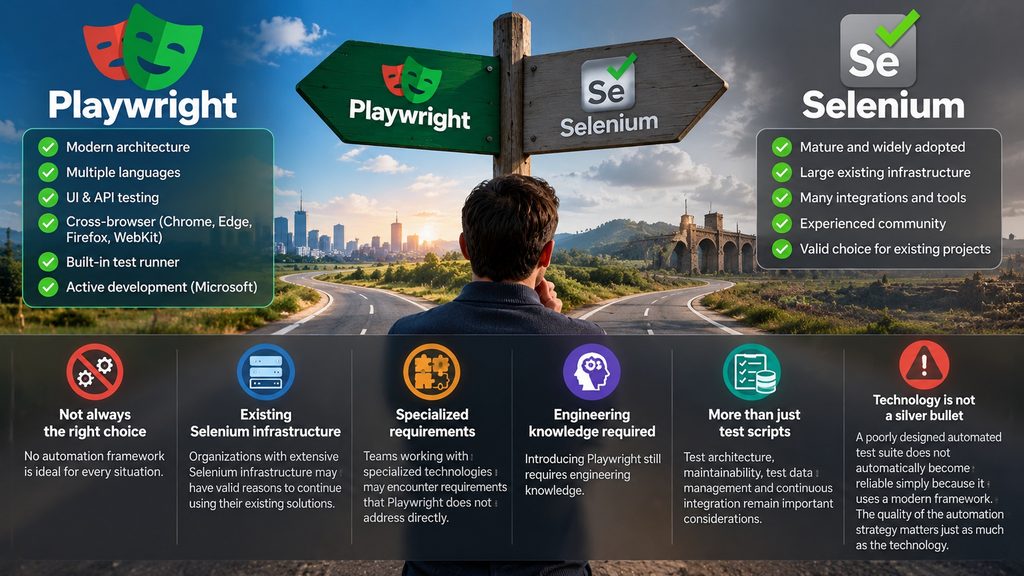
Although Playwright provides an impressive collection of capabilities, no automation framework is ideal for every situation. Organizations with extensive Selenium infrastructure may have valid reasons to continue using their existing solutions. Teams working with specialized technologies may also encounter requirements that Playwright does not address directly. Furthermore, introducing Playwright still requires engineering knowledge. Test architecture, maintainability, test data management and continuous integration remain important considerations. A poorly designed automated test suite does not automatically become reliable simply because it uses a modern framework. The quality of the automation strategy matters just as much as the technology.
Conclusion: A Strong Contender for Modern Test Automation
Playwright combines cross browser automation, multiple programming language bindings, API testing capabilities and powerful debugging tools in a modern open source framework. Its automatic waiting mechanisms, flexible locators and integrated testing capabilities address several common challenges encountered in browser automation. For software testers looking to expand their automation skills, Playwright is certainly worth exploring. It is particularly interesting for teams developing modern web applications and organizations seeking to integrate automated regression testing into their development processes. Playwright will not replace every existing testing technology, but it provides a compelling combination of functionality, flexibility and maintainability.
Ultimately, the value of Playwright lies not simply in automating browser interactions, but in helping development teams build confidence in the quality of their software.
For anyone interested in software testing, quality assurance or test automation engineering, understanding Playwright is a valuable addition to their technical skill set.