Emergency and maintenance scenarios need clear, consistent instructions. Each step must define what happens next, whether the operator answers yes, answers no, or simply confirms an action. A mistake in that sequence can interrupt the procedure or leave the operator without clear guidance.
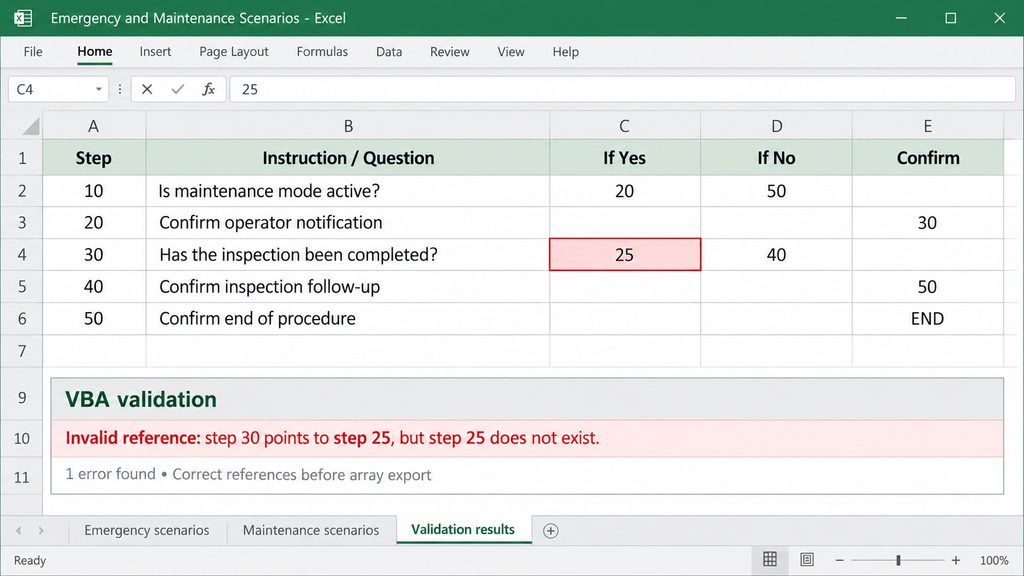
The scenarios I worked with were documented in Excel using a structure of five columns. Each row described a step and defined how the procedure should continue, depending on the operator’s response. Together, these rows formed the decision logic for an emergency or maintenance procedure.
However, the scenarios were prepared manually, which introduced errors. A spreadsheet could look correct at first glance while containing inconsistencies in its underlying logic.
I developed a VBA script to automatically check these scenario definitions. One check verified whether referenced steps actually existed. For example, if answering “yes” directed the operator to step 25, the script checked whether step 25 was present in the scenario. Another check detected missing “yes” or “no” references in steps that required a decision. These errors could leave the operator without a defined next step.
Automating these checks made it easier to identify errors before the scenarios were imported into the target system. It also reduced the repetitive work of manually following references through the spreadsheet.
The next challenge was the import format. The script that executed the scenarios could not import Excel files directly, but it could import arrays. My VBA script therefore also reshaped the scenario data into arrays suitable for import.
This combined validation and conversion in one workflow. The scenarios could be maintained in a familiar spreadsheet, checked automatically, and converted into the format required by the receiving script.
The project applied software testing principles to operational procedures: checking the structure and internal consistency of manually prepared scenarios before those definitions were used in the system.