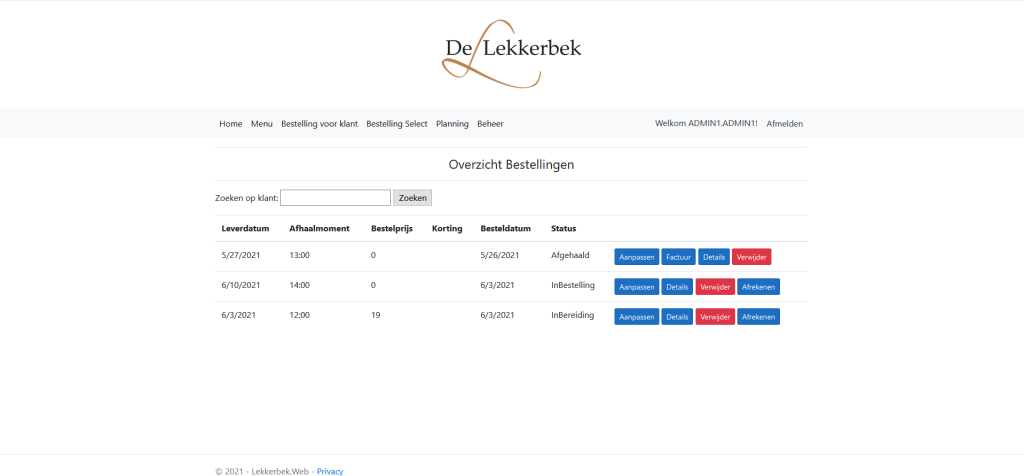
This project was developed as a team exercise during my studies at my first year at UCLL for an associate degree in programming and focused on designing and implementing a complete web application for a small restaurant. The goal was not visual design or marketing, but understanding how a real world application is structured from database to user interface, and how multiple developers collaborate on the same codebase.
The concept was straightforward but realistic. Customers could create an online account, place bookings, and manage their reservations. On the other side, the restaurant owner had a central overview of all bookings, including delivery or pickup date, time slots, prices, discounts, order status, and administrative actions such as editing, invoicing, or closing an order.
Architecture and Technology Choices
The application was built using ASP.NET MVC, which forced a strict separation between model, view, and controller logic. This structure made it very clear where business logic belongs, where data access happens, and how data is presented to the user.
Every visible field in the interface was backed by explicit logic. For each column in the overview table, we had to design database queries, map results to model objects, and expose them through controllers. There was no magic. If a value appeared on screen, it existed because we explicitly wrote the query and connected it to the view.
We made heavy use of data annotations for validation and data integrity. Required fields, formatting rules, and constraints were enforced at model level, which improved reliability and reduced errors early in the workflow.
Database and Query Work
A large part of the learning value came from writing queries and understanding how data flows through the system. Bookings, users, time slots, and status transitions all had relational dependencies. Changes in one part of the system immediately affected other views, which made the importance of correct queries and clean data models very tangible.
This also meant that performance and clarity mattered. Poorly designed queries quickly resulted in confusing results in the booking overview, which forced us to rethink structure rather than patch symptoms.
Team Collaboration and Tooling
The project was managed in Microsoft Azure, including source control and collaboration workflows. We worked with push and pull operations to merge changes, resolve conflicts, and keep the codebase consistent across the team.
Visual Studio was used as the primary development environment. Beyond coding, this included debugging, database integration, and testing changes locally before committing them. Working in a shared repository made version control discipline essential. Small mistakes could affect everyone, which mirrored professional software development environments very closely.
Why This Project Matters
What makes this project valuable that it combined backend logic, data modeling, validation, user interface binding, and team collaboration in one coherent system.
For me, it was an important step away from isolated code exercises toward building a complete, maintainable application. It demonstrated how software behaves as a system rather than as individual functions, and why structure, clarity, and collaboration are just as important as writing correct code.