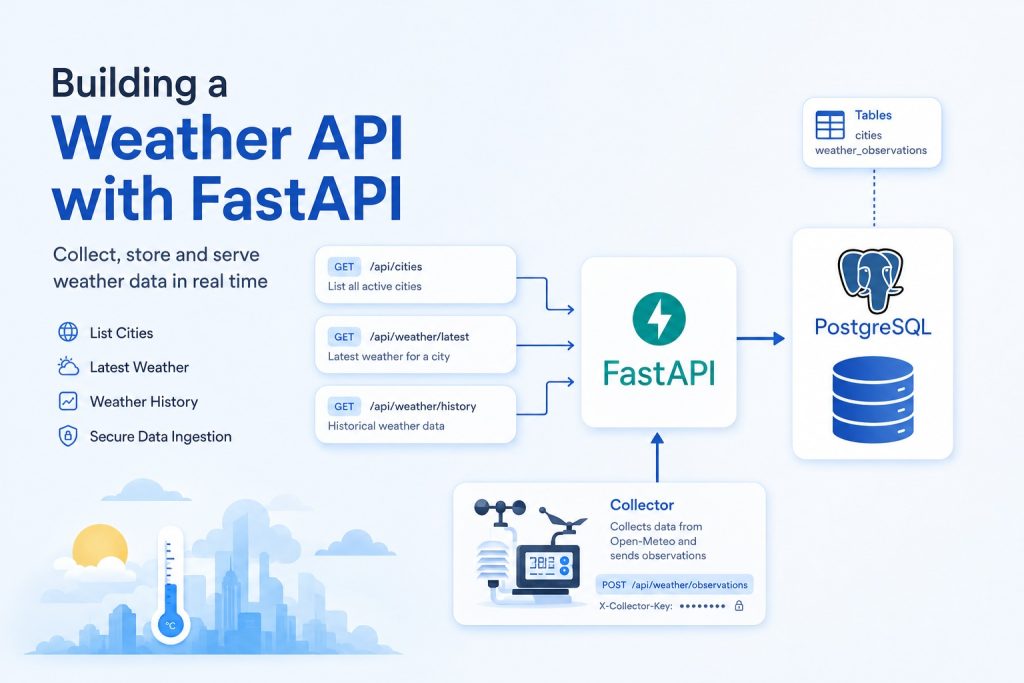
from fastapi import FastAPI, Header, HTTPException
from pydantic import BaseModel
from typing import Optional
import psycopg2
import os

app = FastAPI()

DATABASE_URL = os.getenv(
    "your-ip-address",
    "dbname=yourdbname user=yourusername password=yourpassword host=yourhost port=yourport"
)

COLLECTOR_KEY = os.getenv("COLLECTOR_KEY", "change-this-secret")


class WeatherObservation(BaseModel):
    city_id: int
    temperature_c: Optional[float] = None
    humidity: Optional[int] = None
    pressure_hpa: Optional[float] = None
    wind_speed_ms: Optional[float] = None
    wind_direction_deg: Optional[int] = None
    rain_mm: Optional[float] = None
    clouds_percent: Optional[int] = None
    weather_code: Optional[str] = None
    measured_at: str
    source: str


def get_connection():
    return psycopg2.connect(DATABASE_URL)


@app.get("/api/cities")
def get_cities():
    conn = get_connection()
    cur = conn.cursor()

    cur.execute("""
        SELECT id, name, country_code, latitude, longitude, active
        FROM cities
        WHERE active = true
        ORDER BY name;
    """)

    rows = cur.fetchall()
    cur.close()
    conn.close()

    return [
        {
            "id": row[0],
            "name": row[1],
            "country_code": row[2],
            "latitude": float(row[3]),
            "longitude": float(row[4]),
            "active": row[5]
        }
        for row in rows
    ]


@app.get("/api/weather/latest")
def get_latest_weather(city: str):
    conn = get_connection()
    cur = conn.cursor()

    cur.execute("""
        SELECT
            c.name,
            w.temperature_c,
            w.humidity,
            w.pressure_hpa,
            w.wind_speed_ms,
            w.wind_direction_deg,
            w.rain_mm,
            w.clouds_percent,
            w.weather_code,
            w.measured_at,
            w.source
        FROM weather_observations w
        JOIN cities c ON c.id = w.city_id
        WHERE LOWER(c.name) = LOWER(%s)
        ORDER BY w.measured_at DESC
        LIMIT 1;
    """, (city,))

    row = cur.fetchone()
    cur.close()
    conn.close()

    if row is None:
        raise HTTPException(status_code=404, detail="No weather data found")

    return {
        "city": row[0],
        "temperature_c": float(row[1]) if row[1] is not None else None,
        "humidity": row[2],
        "pressure_hpa": float(row[3]) if row[3] is not None else None,
        "wind_speed_ms": float(row[4]) if row[4] is not None else None,
        "wind_direction_deg": row[5],
        "rain_mm": float(row[6]) if row[6] is not None else None,
        "clouds_percent": row[7],
        "weather_code": row[8],
        "measured_at": row[9].isoformat(),
        "source": row[10]
    }


@app.get("/api/weather/history")
def get_weather_history(city: str, limit: int = 100):
    conn = get_connection()
    cur = conn.cursor()

    cur.execute("""
        SELECT
            w.temperature_c,
            w.humidity,
            w.pressure_hpa,
            w.wind_speed_ms,
            w.rain_mm,
            w.weather_code,
            w.measured_at
        FROM weather_observations w
        JOIN cities c ON c.id = w.city_id
        WHERE LOWER(c.name) = LOWER(%s)
        ORDER BY w.measured_at DESC
        LIMIT %s;
    """, (city, limit))

    rows = cur.fetchall()
    cur.close()
    conn.close()

    return [
        {
            "temperature_c": float(row[0]) if row[0] is not None else None,
            "humidity": row[1],
            "pressure_hpa": float(row[2]) if row[2] is not None else None,
            "wind_speed_ms": float(row[3]) if row[3] is not None else None,
            "rain_mm": float(row[4]) if row[4] is not None else None,
            "weather_code": row[5],
            "measured_at": row[6].isoformat()
        }
        for row in rows
    ]


@app.post("/api/weather/observations")
def add_weather_observation(
    observation: WeatherObservation,
    x_collector_key: str = Header(None)
):
    if x_collector_key != COLLECTOR_KEY:
        raise HTTPException(status_code=401, detail="Invalid collector key")

    conn = get_connection()
    cur = conn.cursor()

    cur.execute("""
        INSERT INTO weather_observations (
            city_id,
            temperature_c,
            humidity,
            pressure_hpa,
            wind_speed_ms,
            wind_direction_deg,
            rain_mm,
            clouds_percent,
            weather_code,
            measured_at,
            source
        )
        VALUES (%s, %s, %s, %s, %s, %s, %s, %s, %s, %s, %s)
        ON CONFLICT (city_id, measured_at, source)
        DO NOTHING;
    """, (
        observation.city_id,
        observation.temperature_c,
        observation.humidity,
        observation.pressure_hpa,
        observation.wind_speed_ms,
        observation.wind_direction_deg,
        observation.rain_mm,
        observation.clouds_percent,
        observation.weather_code,
        observation.measured_at,
        observation.source
    ))

    conn.commit()
    cur.close()
    conn.close()

    return {"status": "ok"}
1. Imports
from fastapi import FastAPI, Header, HTTPException
from pydantic import BaseModel
from typing import Optional
import psycopg2
import os
FastAPI creates the web API.
Header allows you to read an HTTP header from an incoming request.
HTTPException lets you return proper HTTP errors such as 401 Unauthorized and 404 Not Found.
BaseModel comes from Pydantic and is used to define the structure of JSON data your API accepts.
Optional says that a value may also be None.
psycopg2 is the PostgreSQL driver.
os is used here to read environment variables.
2. Create the FastAPI application
app = FastAPI()This creates the application.
3. Database configuration
DATABASE_URL = os.getenv(
    "DATABASE_URL",
    "dbname=yourdbname user=yourusername password=yourpassword host=yourhost port=5432"
)
4. Collector Secret
COLLECTOR_KEY = os.getenv("COLLECTOR_KEY", "change-this-secret")5. The WeatherObservation model
class WeatherObservation(BaseModel):
    city_id: int
    temperature_c: Optional[float] = None
    humidity: Optional[int] = None
    pressure_hpa: Optional[float] = None
    wind_speed_ms: Optional[float] = None
    wind_direction_deg: Optional[int] = None
    rain_mm: Optional[float] = None
    clouds_percent: Optional[int] = None
    weather_code: Optional[str] = None
    measured_at: str
    source: str
This defines what a weather observation submitted to your API should look like.
For example:
{
    "city_id": 1,
    "temperature_c": 31.2,
    "humidity": 74,
    "pressure_hpa": 1007.4,
    "wind_speed_ms": 3.2,
    "wind_direction_deg": 210,
    "rain_mm": 0.0,
    "clouds_percent": 65,
    "weather_code": "3",
    "measured_at": "2026-08-17T12:00:00Z",
    "source": "open-meteo"
}
The nice thing is that FastAPI and Pydantic validate this automatically.
For example:
{
    "city_id": "banana"
}
will be rejected because city_id is supposed to be an integer.
Some fields are optional:
temperature_c: Optional[float] = Noneso this is allowed:
{
    "city_id": 1,
    "temperature_c": null,
    ...
}
But these are mandatory:
city_id: int
measured_at: str
source: str
6. Connecting to PostgreSQL
def get_connection():
    return psycopg2.connect(DATABASE_URL)
This is just a helper function.
Instead of repeating:
psycopg2.connect(DATABASE_URL)everywhere, you call:
conn = get_connection()conn represents the connection between FastAPI and PostgreSQL.
GET /api/cities
@app.get("/api/cities")
def get_cities():
This tells FastAPI: When someone performs an HTTP GET request to /api/cities, execute get_cities().
Then:
conn = get_connection()
cur = conn.cursor()
You open a database connection and create a cursor.
The cursor is what actually executes SQL. A cursor is the object you use to send SQL commands to PostgreSQL and retrieve the results.
cur.execute("""
    SELECT id, name, country_code, latitude, longitude, active
    FROM cities
    WHERE active = true
    ORDER BY name;
""")
So PostgreSQL returns every active city, alphabetically.
Then:
rows = cur.fetchall()Suppose PostgreSQL returns:
1 | Bangkok    | TH | 13.7563 | 100.5018 | true
2 | Chiang Mai | TH | 18.7883 | 98.9853  | true
3 | Phuket     | TH | 7.8804  | 98.3923  | true
fetchall() retrieves all those records.
You then close everything:
cur.close()
conn.close()
And convert the database rows into dictionaries:
return [
    {
        "id": row[0],
        "name": row[1],
        ...
    }
    for row in rows
]
FastAPI automatically converts that Python structure into JSON.
So the client receives something like:
[
    {
        "id": 1,
        "name": "Bangkok",
        "country_code": "TH",
        "latitude": 13.7563,
        "longitude": 100.5018,
        "active": true
    }
]
GET /api/weather/latest
This endpoint is more interesting.
@app.get("/api/weather/latest")
def get_latest_weather(city: str):
Because city is an argument that isn’t part of the URL path, FastAPI interprets it as a query parameter.
So you call:
GET /api/weather/latest?city=BangkokThen this SQL runs:
SELECT ...
FROM weather_observations w
JOIN cities c ON c.id = w.city_id
WHERE LOWER(c.name) = LOWER(%s)
ORDER BY w.measured_at DESC
LIMIT 1;
There are three important things happening.
The JOIN
JOIN cities c ON c.id = w.city_idThe observation contains:
city_id = 1rather than storing "Bangkok" repeatedly.
The JOIN connects:
weather_observations.city_idwith:
cities.idThat’s your normalized database design in action.
Case insensitive city matching
WHERE LOWER(c.name) = LOWER(%s)This means all of these should match:
Bangkok
bangkok
BANGKOK
BaNgKoK
Find newest observation
ORDER BY w.measured_at DESC
LIMIT 1
DESC means newest first.
LIMIT 1 means return only the first record.
So if you have:
12:00  30.1°C
12:15  30.4°C
12:30  30.8°C
12:45  31.0°C
the endpoint returns:
12:45 31.0°CWhy %s?
This:
WHERE LOWER(c.name) = LOWER(%s)combined with:
(city,)is parameterized SQL.
That’s important for security.
You should not do:
"... WHERE name = '" + city + "'"because that can introduce SQL injection vulnerabilities.
psycopg2 safely passes the value separately.
Why (city,) has a comma
This looks weird:
(city,)but that’s Python syntax for a tuple containing one item.
Without the comma:
(city)is just a string surrounded by parentheses.
What if no weather exists?
if row is None:
    raise HTTPException(
        status_code=404,
        detail="No weather data found"
    )
The client gets an HTTP 404.
That’s much better than returning an empty or ambiguous response.
GET /api/weather/history
@app.get("/api/weather/history")
def get_weather_history(city: str, limit: int = 100):
Now you have two query parameters:
city
limit
For example:
GET /api/weather/history?city=Bangkok&limit=50The SQL is similar:
ORDER BY w.measured_at DESC
LIMIT %s;
But instead of:
cur.fetchone()you use:
cur.fetchall()because you want many observations.
The default is:
limit: int = 100So:
/api/weather/history?city=Bangkokreturns up to 100 records.
Whereas:
/api/weather/history?city=Bangkok&limit=1000requests up to 1,000.
This endpoint can eventually feed your graphs.
For example:
PostgreSQL
    │
    ▼
GET /api/weather/history?city=Bangkok&limit=96
    │
    ▼
FastAPI JSON
    │
    ▼
JavaScript
    │
    ▼
Temperature graph
POST /api/weather/observations
This is the opposite direction.
The previous endpoints are reading data:
PostgreSQL → FastAPI → ClientThis one writes data:
Collector → FastAPI → PostgreSQLYou define:
@app.post("/api/weather/observations")so it only accepts a POST request.
The function receives:
observation: WeatherObservationFastAPI therefore expects the request body to contain JSON matching your WeatherObservation model.
Collector authentication
You also have:
x_collector_key: str = Header(None)FastAPI converts this variable name:
x_collector_keyinto the HTTP header:
X-Collector-KeySo the collector sends something conceptually like:
POST /api/weather/observations
X-Collector-Key: my-super-secret-key
Content-Type: application/json

{
    "city_id": 1,
    "temperature_c": 31.2,
    ...
}
Then:
if x_collector_key != COLLECTOR_KEY:
    raise HTTPException(
        status_code=401,
        detail="Invalid collector key"
    )
Wrong secret means:
HTTP 401 UnauthorizedThis prevents random visitors from inserting weather data.
The INSERT
The actual database write is:
INSERT INTO weather_observations (
    city_id,
    temperature_c,
    ...
)
VALUES (%s, %s, ...)
The actual values are passed separately:
(
    observation.city_id,
    observation.temperature_c,
    observation.humidity,
    ...
)
Again, this is parameterized SQL.
This is an important part:
ON CONFLICT (city_id, measured_at, source)
DO NOTHING;
Suppose your collector accidentally sends the same observation twice:
city_id      1
measured_at  2026-08-17 12:00
source       open-meteo
The database won’t insert a duplicate, assuming you have a unique constraint/index on:
(city_id, measured_at, source)That’s useful because collectors can retry requests without necessarily polluting the database with duplicate observations.
This property is commonly called idempotency.
conn.commit()This line is crucial:
conn.commit()An INSERT changes the database, so the transaction has to be committed.
Without the commit, your INSERT may effectively disappear when the connection closes.
GET requests don’t need this because they’re only reading data.
There are four API operations:
                    FastAPI
                       │
       ┌───────────────┼────────────────┐
       │               │                │
       ▼               ▼                ▼
 /api/cities     /weather/latest   /weather/history
       │               │                │
       └───────────────┼────────────────┘
                       │
                     READ
                       │
                       ▼
                  PostgreSQL


Open-Meteo
    │
    ▼
Collector
    │
    │ POST /weather/observations
    │ X-Collector-Key
    ▼
 FastAPI
    │
    │ INSERT
    ▼
PostgreSQL
The collector does not need direct database access. It talks to the FastAPI. The website and the Android app also talk to FastAPI. PostgreSQL stays behind the API.